AspireAi, the AI assistantAI
Ask in plain English — draft a letter, book a visit, price an invoice. AspireAi shows the exact action as a card and waits for your OK before it runs.
The product
From the first booking to the paid claim, every part of the day lives on one record — with AspireAi, an AI assistant, handling the busywork on your say-so. Every screen below is the real product.
Calendar
Book, reschedule and run the day for every practitioner, in the clinic or on home visits, with the drive between home visits worked out for you.

Automatic travel
Drive time and km between home visits, measured from the visit before and added to each booking. Open times show what each would add to the day, with the shortest drive marked, and travel is invoiced to each funder at its own rates where that funder pays for it.
Patients & notes
Details, funding, visits, invoices, letters and progress notes — all on the patient's file, nothing in a separate system.

Waitlist & messages
Every enquiry lands on one board, and every text with a patient sits in one inbox.


Billing & claims
One service, priced per funder. Each funding stream gets its own rate, its own wording on the invoice line and its own item and cancellation codes.

Teams & payroll
Everything about the team that isn't a patient: who they are, what they hold, when they work and what they're owed.

Dashboard & Finances
The Dashboard summarises the practice on one page. All money, in and out, lives in Finances.


Marketing & Practice Insights
Marketing keeps the ads and the referrals. Practice Insights holds the detailed reports, live from the record.


AspireAi
AspireAi is the assistant built into every page. It works from your practice's own record and prepares each action for your approval.

Patient portal & online booking
Patients get secure links — no accounts and no app store. Every link does one thing well.


Phone app
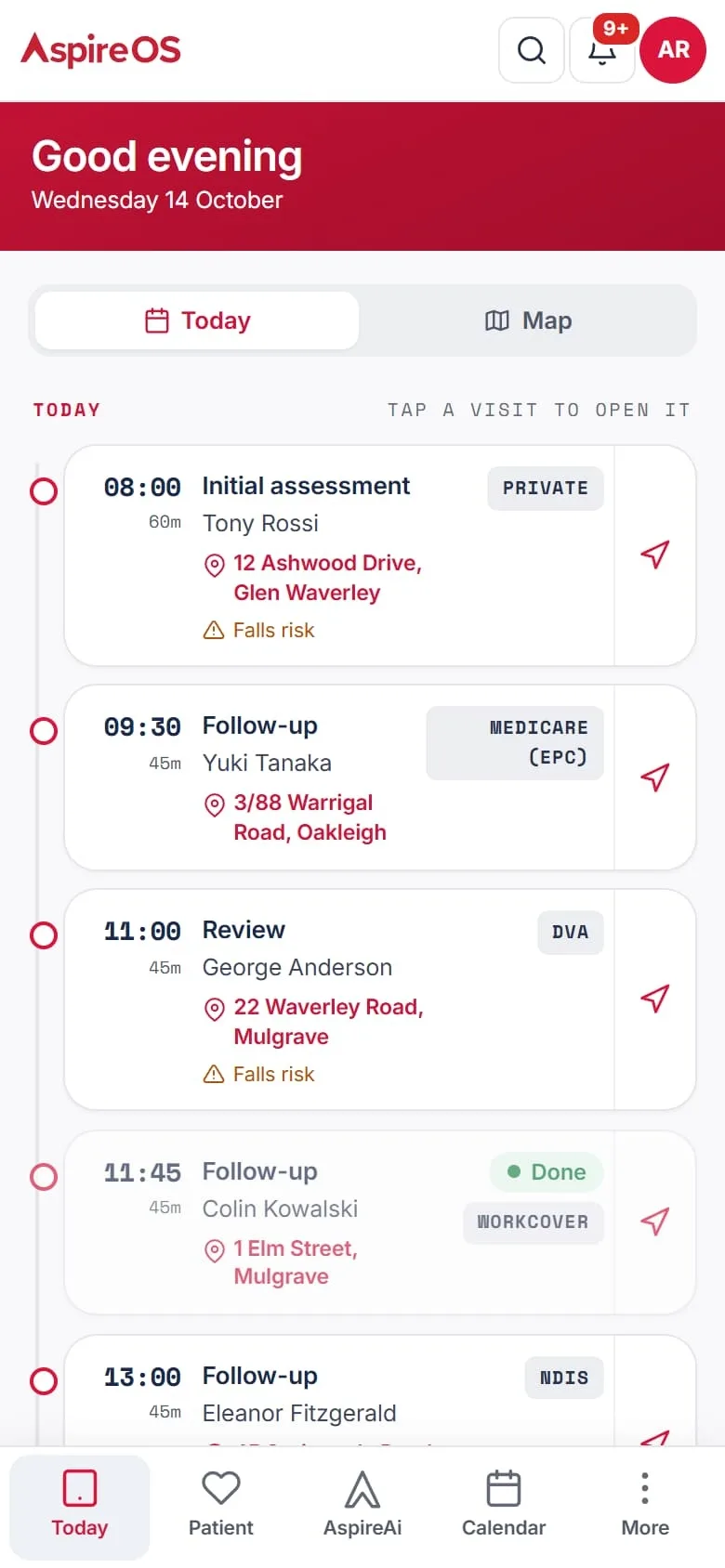
Install AspireOS from the browser and it opens full screen like any other app — no app store, nothing to update.
Integrations
Settings › Integrations & data lists every connection with its status, and each one switches on from there. What is ready today, and what is still to come:

One system, end to end
No stitched-together tools and no double entry. Scheduling, notes, money, comms, your team and your registers all feed the same source of truth.
Ask in plain English — draft a letter, book a visit, price an invoice. AspireAi shows the exact action as a card and waits for your OK before it runs.
Book, reschedule and run the day, with travel time from real road times and suburb-based routing built in.
Templates, dictation and AspireAi drafts, with a version trail on every entry, so the note stays complete and defensible.
One service, priced per funder: each funding stream gets its own rate, its own wording on the invoice line and its own item and cancellation codes — and a stream that does not fund that service is left out. Travel rules are per funder too, and every invoice tracks through to the claim.
Send a pay link, take the payment through your own Stripe, and give patients a portal for their visits and invoices.
Referrer updates and discharge summaries drafted straight from the clinical record — reviewed by you, then sent.
Two-way SMS included (fair use), with nothing extra to buy. Every text and email out the door is logged as delivered, failed or retried.
AspireAi's summary of the practice, then every dollar in and out — profit, revenue, to invoice, money owed and costs. Nothing to key in.
Referrals and ads in one place, and the detailed reports on the calendar, patients, compliance and the team.
Capture the conversation and get summaries, decisions and action items that actually stick.
Employment records, leave requests and approvals, timesheets and payroll prep.
Telehealth visits carry your own Zoom, Microsoft Teams, Daily, Whereby or WeChat link — the patient joins from a private link.
Scoped API keys, a REST v1 and signed outbound webhooks — wire AspireOS into the rest of your stack.
Enquiries land on a kanban with suburb and region lenses. Build your own form, host it on a public link, and a lead form fills the waitlist while an intake form opens the patient record.
Turn it on in Settings: home-exercise videos assigned with sets, reps and your notes, watched in the patient's own portal, and new exercises made for your practice each month.
Raise a month of visits in one pass. Narrow by date range, status, location, practitioner, patient tag or service, and see the exact count before you commit.
Publish your price list — every service, funding rate and product with its codes and caps — as a spreadsheet to work from and a dated PDF on your letterhead to hand a patient or a funder.
Install AspireOS on your team's phones: the day's visits in order with directions and driving totals, and the notes still to write.
A team directory, a credential expiry matrix that chases registrations and checks before they lapse, recruitment through onboarding, rostering, performance and career pathways.
Report from a phone in about a minute. Every incident and complaint is triaged, investigated and tracked through to a close-out someone has to approve.
Named risks rated on a likelihood and impact matrix, each with an owner and a review date, so a risk cannot quietly go stale.
What the practice owns, who has it, where it is, what condition it's in and when it is next due for attention.
All features
224 features in 10 groups. Anything that isn’t ready yet says so.
Add-on an add-on module you turn on (most are free) · Off by default switch on in Settings · Connect your own Stripe uses your own account · Coming soon not available yet
01 · 54 features
The daily work, in the order of the sidebar: Calendar, Patients, Messages, Invoice, Exercise Library, Contacts and Waitlist.
A column for each practitioner, filtered by person or clinic site, coloured by service, with note and invoice status on every visit.
Click a free slot to book a patient visit, a support activity (reports, case conferences) or busy time.
Drag a visit to another time, day or practitioner, with the option to tell the patient.
Every so many days, weeks or months, for a number of sessions or until a date.
Several clinicians on one visit, or a class where each attendee is billed under their own funding.
Kilometres and minutes from the day's route using real road times, and free slots ranked by the extra drive they add.
Setup time either side of a visit, and warnings for clashes, the patient's availability and missing insurer approval.
Ranks every opening across the team by timing, continuity, driving and your own scheduling rules, and explains each score.
One click shows alerts, contacts and directions, with buttons to confirm, arrive, complete, cancel or mark a no-show.
Cancel a visit, a weekly run or all upcoming visits, applying your cancellation-fee rules.
A cancellation raises a task and tells admins how many waitlist patients match.
Write the note or raise the invoice in a pop-up without leaving the diary.
A telehealth booking carries your video link, ready to send to the patient.
Each practitioner's visits copied into their own Google Calendar (awaiting Google's approval).
The same for Microsoft Outlook.
Keeps each patient's regular weekly hour, so a one-off cancellation is not given away.
Search by name, suburb, phone or email; filter by status, funding, suburb and practitioner.
Details, the funding questions for the scheme chosen, tags, alerts and your own custom fields, with a duplicate-phone warning.
Funding, alerts and tags up top, with age, phone, practitioner, last visit and next appointment at a glance.
The fields each funder needs — NDIS, Medicare, DVA, WorkCover, TAC, Support at Home, health fund — with expiry warnings.
GP, referrer, specialist, plan manager, family and carers, with optional regular update letters to each.
Funded episodes tracked by sessions, hours or dollars, with a meter of what is left.
Templates (SOAP, initial, review, discharge and your own), dictation, AI note, version history, lock, PDF and email.
Folders and uploads, intake forms with every answer, and sharing a file to the patient's portal.
Initial, progress, discharge, Certificate of Capacity or custom letters drafted from the record and sent as PDFs.
Portal messages, calls, and every reminder, invoice and text sent with its delivery status.
Drafted from your template for NDIS and Support at Home, signed online, with a register of who has signed.
A second clinician to cover leave, and a guided handover to a new practitioner.
Moves everything from a duplicate file onto the right one.
Every text sent and received, laid out like a phone's messages, with search and unread counts.
Reply to a patient, or text any Australian mobile, signed with the practice name.
On the practice's own number, YES confirms the next appointment and STOP turns texts off for that patient.
Your own number for texts and replies, included on every plan (fair use). No SMS add-on to buy.
Every invoice with its status, filters and CSV export, plus a Payments tab for recording and matching payments.
Add YouTube, Vimeo or Loom links by category and play them on the page.
Around 240 filmed exercises, shown to patients only after a clinician at the practice approves each clip. Part of the Exercise Library add-on, A$15 + GST per practice per month.
Sets, reps, weight and notes; the patient sees them in their portal. Part of the Exercise Library add-on.
GPs, referrers, plan managers and family, grouped under their company, with every patient each reaches.
Referral history, updates owed and a call log for each referrer.
Enquiries as cards in your own stages, with days waiting and a “going cold” flag — or as a table or a map.
Each clinician's service area on the map, and the suburbs nobody covers.
From the booking page, website forms, a chatbot and the API, with an automatic thank-you.
Send the intake form, then accept it to create the patient file.
Tick each funder's checklist; verified enquiries move to “Ready to schedule”.
Ranks clinicians by suburb, route, language, availability, funding and gender preference, with the reasons.
Log calls, texts and emails, with a guide through the follow-up rounds.
Checks “Ready to schedule” against free capacity and gives up to three clinician options per person.
Your tasks and the ones you delegate, with priority and due date; type “Ask Sam to book six visits” to delegate.
One list of things needing a person, from money owed to quiet enquiries and unbilled visits.
The front desk's shared calls, with attempts logged.
Patients whose plan says more treatment but who have nothing booked, with prompts to the practitioner.
Draft, approve and send letterhead PDFs; GP and referrer updates due by cycle, with “Draft all due”.
Record each incoming referral, match it to a patient and track the reply owed.
One button queues reminders for every visit tomorrow.
02 · 29 features
Everything about the people who work in the practice. The People directory and Credentials come with the core app; recruitment, rostering, leave, timesheets, professional development, the workspace, safety and assets are add-on modules.
Every employee and contractor as a card, filtered by role, employment type, region and site, with credential traffic lights.
One file per person: details, contract, compliance, performance, development, timesheets, assets and history.
What is still missing before a new person can be booked, each with a link to fix it.
Each person's days, hours and suburbs or radius on a map; the calendar books against it.
Employee or contractor, hours and FTE, rate card, commission and billings target, with a break-even figure.
Tax file number, bank and super stored encrypted; every reveal is logged.
A new practitioner answers a few questions a page and the answers fill their file.
A leaving checklist with a last working day; the person's history is kept.
Twelve built-in credentials (AHPRA, WWCC, police check, insurance, first aid and more) plus your own, green, amber or red by expiry.
45 days before expiry the person gets a task, an email and a phone alert.
Staff upload their own certificates and new expiry dates; managers can edit.
Drag candidates from Applied through screening, interview, reference check and offer to Employee.
Resume, registration, and scored screening and interview questions you can reword.
Accepting an offer creates the staff file and a checklist for employees, casuals or contractors.
Documents, policies, the Fair Work statements and the contract signed online.
Nine scored measures; passing makes the person active and bookable.
Built from availability minus leave and public holidays, with capacity, utilisation and open shifts.
Drawn from completed visits or typed in, with files attached, then submitted for approval.
The approver ticks each priced line; approval waits until the totals match.
A contractor drops in a PDF or photo and AspireAi reads it into boxes to check.
Each fortnight's approved hours and top-ups per employee, with problem flags and import files.
Approved timesheets into a draft pay run — never finalised for you.
Annual, personal/carer's, unpaid and long service requests, approved against balances.
After leave is approved, each affected visit with free colleagues and the extra drive, moved in one press.
Probation, quarterly and annual reviews, and 15 built-in practice KPIs plus your own.
PD sessions with RSVPs, development goals and a career ladder with each person's readiness.
Guided reports with photos, triage, investigation and sign-off; complaints resolved against a deadline.
Risks rated by likelihood and impact; equipment and vehicles with holder, condition and maintenance.
Channels, meetings with a live written transcript and a summary, and a team feed.
03 · 26 features
How the practice is going: the Dashboard sums it up, Finances holds the money, Marketing the growth and Practice Insights the detail.
The whole practice in five minutes: profit, money in, money out, KPIs, the diary, growth and the team.
A short written read by AspireAi, made only from the figures on the page.
What needs fixing, what to watch and what is going well, each linked to where it is fixed.
About 15 KPIs scored on track, watch or off track against your targets.
Profit or loss this week and last, with twelve business metrics, filterable by practitioner.
By month and funding source, and every billed item, with CSV export.
The money leaking: visits never invoiced, uncharged late cancellations, travel left off.
Every payment and refund; outstanding and overdue totals and aged debtors.
The NDIS bulk payment file for agency-managed participants, with problems flagged first.
Drop in statements, bills or payslips; every payment is read, sorted, and a rule learned for each payee.
Equipment purchases and anything else, in your own categories, with GST, receipts and a CSV; each counts in profit where you file it.
Timesheets and contractor invoices to approve or send back; nothing is paid twice.
New patients, cost per new patient, referrals and bookings over 7, 30 or 90 days, with a plain-English read.
Daily figures from your own ad and website accounts (awaiting Google and Meta approval).
Referral sources, GP relationships, campaigns and reviews, and who refers most.
Marketing consent, a do-not-contact list, ready-made patient lists and drafts that need approval.
Appointment and support-activity reports by status, service, practitioner and funding.
Cases, the waitlist and wait times, retention and lapsed patients.
Progress notes still outstanding, and forms submitted.
Workload, utilisation and a performance table per practitioner.
Policies and agreements in folders; insurances, leases and registrations with expiry lights.
A daily briefing of urgent items, trends and opportunities, each with its evidence and a next step.
Vision, SWOT, objectives with key results, and a roadmap.
Feedback from any channel, themes and scores, and happy patients to ask for a Google review.
Suggest an improvement from any screen, with a roadmap, voting and a changelog.
The practice's own manual, with pinned emergency guides.
04 · 23 features
The assistant built into AspireOS. It drafts and proposes; nothing is booked, sent, billed or changed until a person presses the button.
At the top of the sidebar and in the middle of the phone's tab bar; ask in plain English, typed or spoken.
Each new chat opens with what needs your attention: overdue invoices, visits to bill, notes in draft, leave to approve.
Today's visits, a run sheet, patients and enquiries, and the billing queue and revenue for those allowed to see it.
Step-by-step guides to AspireOS, and “take me there” to about 50 screens.
Answers “what do we do when…” from the practice's written procedures, in its own words.
Reads screenshots, and searches the web for general questions like award rates — never with patient details.
“Let's do my notes” walks through every unwritten visit; a quick description becomes a draft note.
Today's visits with Complete, Note and Cancel on each, and the booking form filled in from your request.
Invoice today's visits, chase all overdue, record a payment, send tomorrow's reminders.
Drafts texts, emails, portal replies and letters, shown in full before Send.
Add a patient, case, contact or enquiry; create, delegate or close tasks.
Change one practice setting at a time, shown as before and after.
New practices finish setup by chatting, and can drop CSV exports from their old system into the chat.
Drop in a claims report or bank statement to match against invoices.
Dictate or paste the consult and it is sorted under your note headings for review — on the phone too.
Rewrites a note professionally (the original is kept), and builds progress reports from completed notes.
Bank statements, bills, contractor invoices and remittances read into rows to check.
Nothing for a practice to set up; built and supported by OptiTide.
Financials are the owner's; practitioners see their own patients and visits.
It does not diagnose, choose treatments or approve claims.
Every action confirmed in chat and every automatic step is recorded.
A “how we do things” list AspireAi reads into its answers.
Drafting and acting automatically under the owner's settings.
05 · 17 features
What patients, referrers and coordinators see and use — by secure link, with no password and no app store.
Each patient gets their own link by text or email; it can sit on their home screen like an app.
Upcoming and past visits; ask to reschedule or cancel, seeing any cancellation fee first.
Their exercises with sets, reps, notes and video, with the Exercise Library add-on.
Every invoice as a tax invoice or receipt; pay by bank transfer, PayID, or card once the practice connects one.
Two-way messages with the practice, letters to download, and cards and referrals to upload.
Update contact details, ask to change funding, and sign the service agreement.
Join the video visit from a private link.
Your own link for your website, ads and socials; patients ask for a call back and the request lands on the Waitlist.
The booking page asks a standard set of questions; customise your intake form in Forms.
A secure address your own website form or chatbot can send enquiries to.
Your Google tag fires when a booking request succeeds.
14 field types including signature and file upload, and questions that appear after certain answers.
Medicare, NDIS, DVA, GP and emergency-contact answers land in the right fields; review and apply each one.
Signed online by the participant or nominee, with every NDIS patient's agreement status at a glance.
The signing link goes to the coordinator when an NDIS intake arrives.
By email and text at the times you choose, held back during quiet hours.
Patients see the practice as the sender, and replies reach your own inbox.
06 · 9 features
The same AspireOS, laid out for a clinician on the road. It installs from the browser; there is no App Store or Google Play version.
One tap on Android, Add to Home Screen on iPhone; it opens full screen like an app.
The day's visits in order with addresses and alerts, a map, the drive for each leg and one-tap navigation.
Patient, address and alerts before you walk in; arrive with a tap, then note and complete.
Mark it happened, write the note, raise the invoice and attach files on one screen.
One press books the recommended follow-up sessions at the same time with the same practitioner.
Notes to finish, tasks, credentials to upload, working days and leave requests.
Visits today, utilisation against target, cancellations and driving.
Each person picks which events alert them.
Patient pages are never stored on the phone.
07 · 25 features
From finished visit to money in the bank.
Completing a visit drafts its invoice, priced from the service and the patient's funding.
One button for a day's visits, several visits on one invoice, or bulk invoices by practitioner, service or location.
Per visit, weekly, fortnightly or monthly, split by treating practitioner.
Your logo, ABN, funder references, payment terms and bank or PayID details.
Emailed to the billing contact, plan manager, insurer or patient, with delivery shown.
Repeating series, reopen to correct, cancel with the record kept, and numbering carried on from your old system.
Private, private health insurance, NDIS, Medicare (EPC), DVA, WorkCover, TAC and Support at Home, plus your own.
Funded sessions, hours or dollars drawn down visit by visit (“session 3 of 5”).
The right payer for plan- and self-managed invoices; travel within NDIS limits; price limits as caps.
The bulk payment file for agency-managed participants.
Referral, sessions and expiry on the case, and each invoice names what would stop the claim.
Claim details, insurer approval warnings, and the insurer or care partner billed and chased.
Lodge claims and check Medicare cards through Tyro Health (awaiting Tyro's approval).
Lodge DVA claims from AspireOS.
Claiming from the health fund at the point of care.
Part payments, any method or funder, with receipts emailed automatically.
Screenshots, remittances or bank exports — AspireAi matches each to its invoice for you to confirm.
Full or part refunds, or a reversal of a payment entered in error, with the reason kept.
A “Pay securely” link on every invoice, with Apple Pay and Google Pay.
A deposit invoice with a pay link for each new booking.
With the PDF attached, repeated every few days; funders chased, not patients.
Upload a claims report or bank statement and see what matched and what is unpaid, short or unclaimed.
For each funder its own price, item code, cancellation code and travel rules, in one grid.
Custom rates, cancellation and no-show fee rules, and GST per service, product and line.
The whole price book as CSV or PDF.
08 · 18 features
Settings › Integrations & data lists every connection with its live status.
Reminders, confirmations and replies on your own number, through AspireOS's own carrier.
Sent in the practice's name, with replies to the practice's own address.
Card payments on invoices and pay links.
Invoices out and payments back.
Zoom, Microsoft Teams, Daily, Whereby or WeChat, opened from each telehealth visit.
Approved timesheets into a draft pay run.
Pull everything across with an API key from your current system, and run both side by side with a nightly pull.
Let your other software read and create records, with signed webhooks and a delivery log.
A read-only reporting feed for your own dashboards.
Road distances and drive times for travel, and address suggestions as you type.
Card payments, online Medicare claiming and Medicare card checks (awaiting Tyro's approval).
Health-fund claiming at the point of care.
Invoices out and payments back.
Each practitioner's visits in their own Google Calendar (awaiting Google's approval).
Each practitioner's visits in their own Outlook calendar.
Ad and website figures for Marketing (awaiting Google and Meta approval).
Sending changes from AspireOS back to the practice software you are moving from.
Phone and desktop alerts for the team.
09 · 15 features
Nine Settings tabs, with a search that finds any setting by everyday words.
Name, logo, ABN, hours and the voice AspireAi follows; the logo and ABN print on letters and invoices.
Sites for appointments and practitioners.
Patient, client or participant, on everything patients and funders see.
Tags, custom fields, funding types and stages; note, letter, email, text, invoice and agreement templates.
Reminder timing, quiet hours, cancellation notices, rebooking nudges, credential renewals and chasing.
What happens after a visit or an incident as tasks; a subscriber list and a confirmed send.
Owner, admin, senior and practitioner, with job titles that preset limits.
29 permissions the owner can narrow by role or job title.
An authenticator-app code, or a code by text.
Activity log, login history, communication log and AI activity.
Practice data stored in Sydney, with scheduled backups kept off-site.
Team, services, patients, contacts, cases, notes, appointments and invoices from your current practice software or any spreadsheet.
The registers as CSV, or every record as one file, at any time.
Hold every patient message while you set up, or practise in a private copy that can never contact anyone.
Explore with demo data, start again, then tick off what's left and go live.
10 · 8 features
One core app for every practice, plus optional add-on modules. Turning one off never deletes anything.
AspireAi, Calendar, Patients, Messages, Invoice, Contacts and Waitlist; the People directory and Credentials; the Dashboard; telehealth; the phone app; and Settings.
Exercise Library, To Do List, Recruitment, Rostering, Leave, Timesheet / Invoice, Professional Development, Workspace, Safety, Assets, Finances, Insights, Documents, Marketing, Google review requests, Bring patients back. Most, Workspace included, are free; Finances is A$5 + GST per practice per month. Turn them on or off in System › Modules. Medicare & DVA is coming soon.
A$15 + GST per practice per month, including 2 new exercises a month for the practice, shared by everyone in it. Included exercise credits refresh each month and do not roll over; more can be bought as exercise credits (1 exercise credit = 1 new exercise).
$45.00 + GST per practitioner a month ($49.50 incl. GST), or $40.00 + GST a month billed yearly ($480.00 + GST a year, $528.00 incl. GST). Australian dollars plus GST; AspireAi included. Admin roles are free: you pay for the people who treat.
16 days, no card needed. The owner adds payment in Settings to carry on.
Monthly or yearly, for the number of people you choose; changes start at renewal.
Save a card once to pay the subscription.
Refer paying practices for 10%, 30% or 50% off for 12 months (1, 5 or 10 referrals), applied at renewal.
Security
Patient data deserves more than a checkbox. Isolation, access control and an honest AI model are built into the foundations, not bolted on. The detail is on the Security page.
Every request is resolved to one practice and scoped to it in the application layer, and public links are gated by unguessable per-practice tokens.
Owners, admins and practitioners see and do only what their role allows — enforced on the server, not just the screen.
Automations handle the everyday. AspireAi prepares the rest for your approval. Reminders and confirmations run on rules your practice sets and can switch off. Anything else AspireAi proposes shows exactly what will change and waits for a person to approve it.
Sensitive actions and every message out the door are recorded in an append-only audit trail you can review.
Runs on Postgres hosted in Sydney, Australia, so patient data stays onshore.
API keys are shown once and stored hashed. Each key carries read/write scopes and can be revoked at any time.
Create your own practice: it starts on a 16-day free trial, no card needed, with sample data from the setup wizard if you want it.